Changelog

Colored cards and iCloud sync

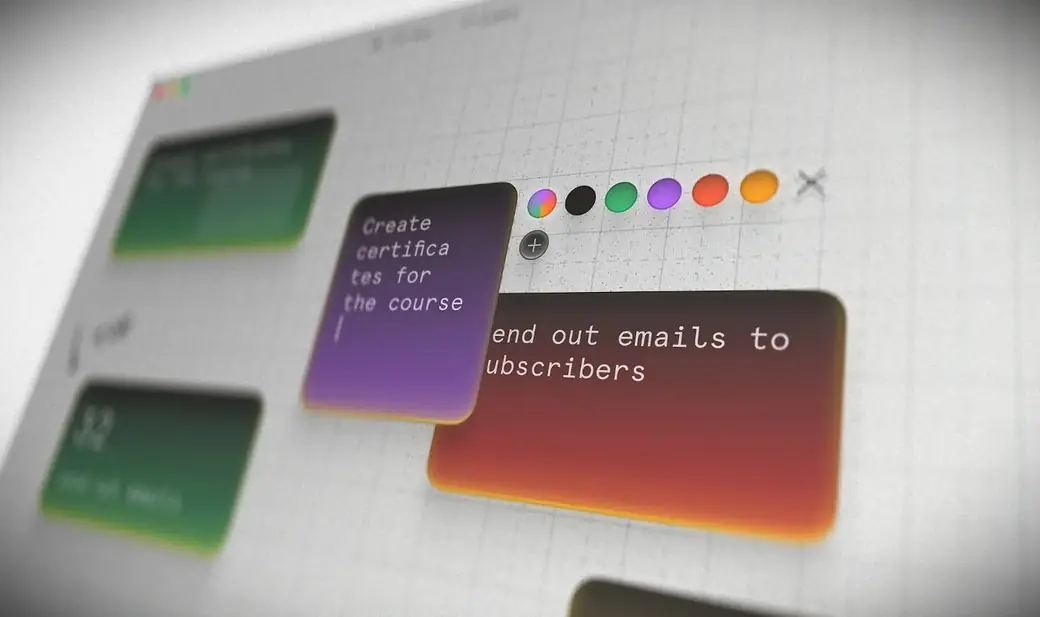
Colored cards on the Forma canvas, with the new color picker open beside a purple card

Cards can now have a color, and your boards follow you to every Mac you own.

New

  • Colored cards: Click a card and a color wheel appears beside it.
  • iCloud sync: Your boards and everything on them stay in sync between your Macs.
  • Settings window: Existing options plus new ones, like launch at login and resetting preferences.

Improved

  • New macOS 27 app icon with the glass effect.
  • Bug fixes.

Custom cursors, dividers, and a lighter app

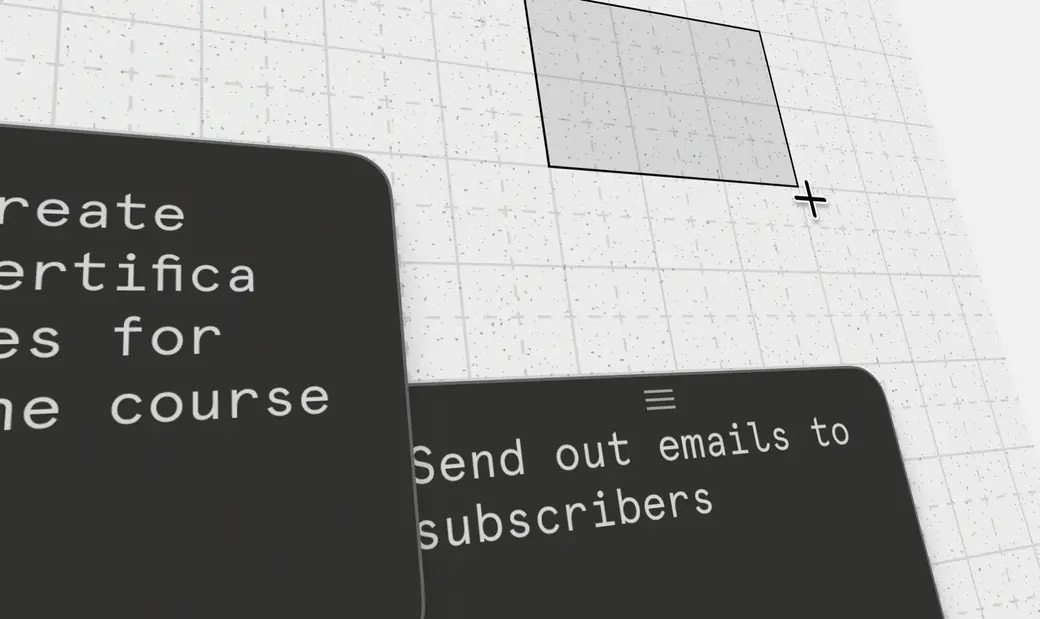
The Card tool's crosshair cursor drawing a new card on the Forma canvas, next to two dark cards

Small touches that make the canvas feel more responsive, and an app that's about 20% smaller.

New

  • Custom cursors: Each tool now has its own cursor.
  • Quick erase: With the Card tool active, hold the right mouse button to switch to the Eraser temporarily.
  • Dividers: Type --- or use the (+) menu to add a divider to a card.
  • Symmetric resize: Hold Alt while resizing to resize both sides of a card at once.
  • Reduce Motion: Forma respects the system setting and turns off all animations.

Improved

  • Headings work with or without a space after the hash (#Heading and # Heading).
  • It's easier to start editing a card while the Marker tool is active.
  • The app is about 20% smaller (1 MB).
  • Bug fixes and optimizations.

Smoother resizing and scrolling

A round of fixes and improvements following the multi-board release.

New

  • With a card in edit mode, press Delete to delete it.

Improved

  • Resizing cards feels much smoother and easier.
  • Better trackpad scrolling on boards.
  • Moving the window with the Marker selected no longer leaves dots under the title bar.
  • Double-clicking the title bar now zooms the window.
  • Other small tweaks.

Multi-board

One of the most requested features is finally here. Create as many boards as you want, for different projects, school, work, or personal things, and keep everything organized separately, exactly how you want it.

New

  • Multi-board: Create and switch between as many boards as you need.
  • Paste to card: Press Cmd+V to create a card from your clipboard. See Help → Keyboard Shortcuts for the full list of shortcuts.
  • New onboarding: A refreshed first-run experience that ends on a welcome board.
  • Arrows: Typing -> turns into an arrow symbol.

Improved

  • New card movement and snapping that feels much smoother.
  • Entering edit mode on a card no longer shifts the text.
  • Other quality-of-life improvements and bug fixes.

Formatting shortcuts

More keyboard shortcuts and a calmer editing experience.

New

  • Cmd+B makes selected text bold.
  • Cmd+I makes selected text italic.
  • Cmd+Delete deletes the card you're editing.
  • Keyboard Shortcuts: Help → Keyboard Shortcuts shows the full list, grouped by area.

Improved

  • Drag a card from anywhere on it, not just the top handle.
  • Text spacing and padding no longer shift when you enter edit mode.
  • General stability and interaction polish across the canvas and editor.

Polish

Tweaks and changes to make the app smoother.

Undo, redo, and a markdown toolbar

New

  • Markdown toolbar: A new way to insert markdown into a card.
  • Undo and redo: Step back and forward through your changes.
  • Drawings stick to cards: Marker lines drawn on a card now move with it.

Forma is here

The first release of Forma: one canvas for your notes, tasks, and sketches on the Mac.

  • Cards with rich text, markdown, task checklists, and nested lists.
  • Pressure-sensitive marker strokes drawn directly on the canvas.
  • An eraser for individual strokes or whole cards.
  • A one-time purchase with your notes stored locally, no account required.